Installing recovery
I will be providing the original and patched recovery_ramdisk.img image.
The recovery_ramdisk_magisk.img image is the patched output from the following steps.
1. Download patched Magisk recovery
- Download patched Magisk
recovery_ramdisk_magisk.img(or whatever name you changed it to) to your computer where the Android SDK platform tools are located (where adb.exe, fastboot.exe is located). - Open a terminal inside that folder.
2. Flash patched Magisk recovery
- Make sure ADB debugging is enabled and the bootloader is unlocked from previous steps.
- Reboot your phone into fastboot using:
./adb.exe reboot bootloader. - Flash your patched Magisk recovery by running:
./fastboot.exe flash recovery_ramdisk recovery_ramdisk_magisk.img. - Reboot your phone into your system:
./fastboot.exe reboot.
3. Boot into the patched Magisk recovery
- Wait for phone to boot back into system.
- Reboot your phone into patched rooted Magisk recovery using:
./adb.exe reboot recovery. - Wait for phone to reboot. It will preset a warning about using an unlocked bootloader.
- It should look like a regular power on into your login/swipe screen.
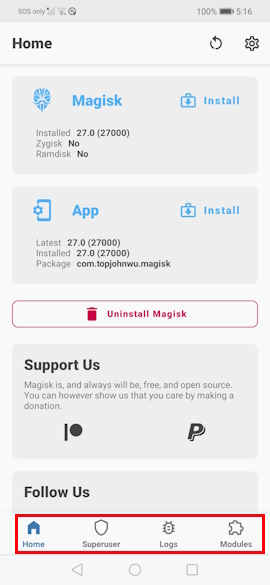
- Unlock phone and check if Magisk has root permissions.
- If it is rooted then the
superuserandmodulesbuttons on the bottom navigation bar will not be grayed out. - Press on those buttons and they should work and take you to their respective pages.
- If it is rooted then the