Fastboot unlock
1. Download Android SDK platform tools
- Link (Backup)
- Official source of these tools are from the Android SDK website here
2. Enable ADB debugging on your Honor Play
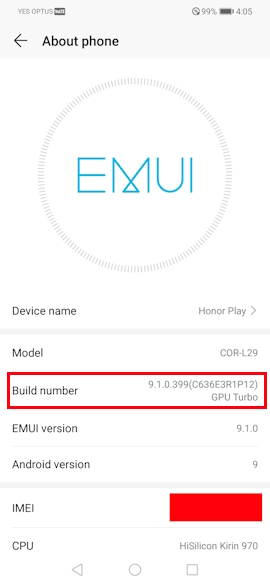
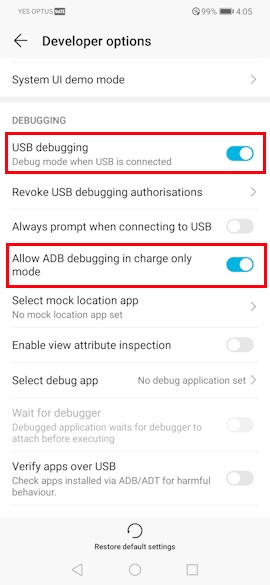
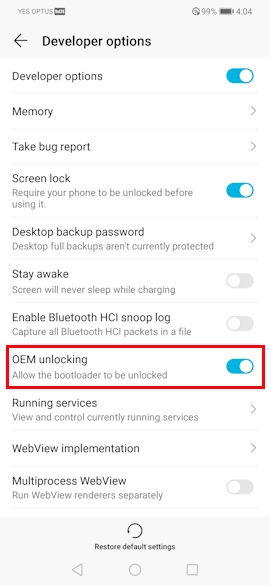
- Go to settings menu.
- Go to
About system. - Click multiple times on the
build versionuntil you get adeveloper optionsunlocked message. - Go to the
developer optionsmenu and enableADB debugging. - (Optional) Select
allow ADB debugging in charge modeto streamline your experience. (Be sure to disable this afterwards). - Turn on the toggle silder for
OEM unlock. (This must be on).
3. Reboot into fastboot
- Unzip and open a terminal where
adb.exeis located. - Reboot your phone into fastboot using:
./adb.exe reboot bootloader.- If it does not work run:
./adb.exe devicesto make sure your device is present in ADB mode.
- If it does not work run:
4. Unlock in fastboot mode
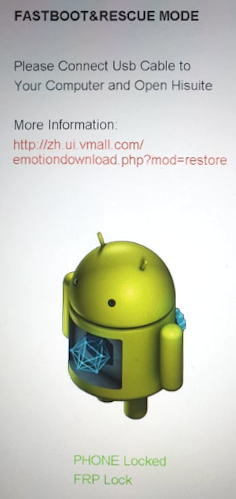
- Wait for your phone to enter fastboot.
- Unlock your bootloader by running:
./fastboot.exe oem unlock [BOOTLOADER_CODE].- If it does not work run:
./fastboot.exe devicesto make sure your device is present in fastboot mode.
- If it does not work run:
- Reboot your phone by running:
./fastboot.exe reboot.
5. Confirm that bootloader is unlocked
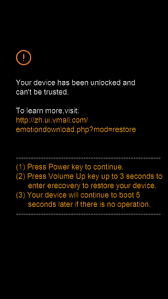
- When your phone is starting up you should see the above warning.
- Either wait or press the power key to boot into your stock system rom.